Tuesday, December 6, 2011
Game Work
I have uploaded my game on student net and it is completed. I am very pleased with the way my game turned out to be and it is very fun and challenging to play. Three people have tried my game and they were claire, derya and sir. They all said good comments about my game, they liked it a lot and found it really awesome.

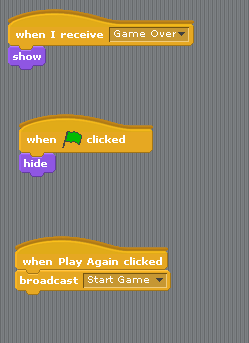
Final Sprite 4, 5 and 6


This is sprite 4,5 and 6.

This is the scripts for sprite 5.

This is the scripts for sprite 6.


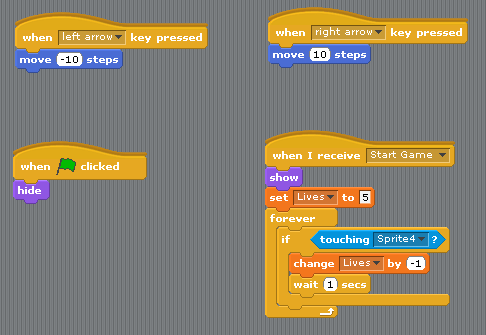
Final Rocket Ship Scripts
 These are the scripts for the rocket ship and an image of the rocket ship.

Monday, December 5, 2011
Backgrounds Sprites For Space Shooter

 These are the backgrounds for my game.
Sunday, December 4, 2011
Sprite 1 rocket ship

Space Shooter Backgrounds
 I have five backgrounds for my game, three are for the levels and the other two are the start screen and the game over screen. When the green flag is clicked it will trigger the background to go to the start screen and when the space bar is pressed it will broadcast to a new background, which will be the level 1 background. When the green flag is clicked at the smae time music will be palyed in the background. So far I have broadcast the start screen, game over screen and level 1 screen, I still have to broadcast for level 2 and 3 screen.

Scratch Challenge 4
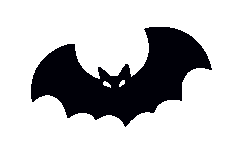
 This feature makes the bat switch costumes so it looks like it is flying, but also as the costumes change it increases its size by 5, so it will look close up and enlarged.

Scratch Challenge 3
 The set up allows the bat to glide in three different directions and it changes costumes to show an effect of the bat flying.

Scratch Challenge 2
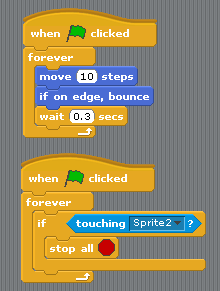

 The aim of this scratch challenge is that the when the fish touches the starfish the movement of both sprites has to stop. Both sprites are moving 10 steps and bounces off if touches the edge and also changes direction.
Tuesday, November 1, 2011
Scratch Challenge 1

This set up makes the hippopotamus glide in different directions and depending on which side it touches, it glides the opposite direction when it touches the edge of the screen.

Sunday, October 30, 2011
Dance twist


Interactive Whirl


Key Moves


Sunday, October 23, 2011


Change Colour

Each time you press the space bar the colour of the butterfly changes.

Animate It

When you click on the green button the ghost stays on costume 1 for 1 second and then the angry eyebrows come on the ghost, and that is costume 2, costume 2 waits for 1 second, then goes back to costume 1, repeating forever.
Keep Score

When you click on the green button the dog chases the cat, and when the dog first touches cat it starts a score and after that the score adds depending how many times the dog touches the cat.
Subscribe to:
Posts (Atom)